Enabling Blackboard LMS Integrations
Outcomes users can import student-level results from their Blackboard LMS Gradebook easily when this LMS integration is enabled.
Enabling LMS Integrations
To enable an LMS integrations an Outcomes site administrator will need to navigate to Settings > General Settings > Individual Student Scores > Enabled. Check the LMS box and complete the steps in the instructions for either Blackboard LMS or Canvas. The Outcomes site admin will need to work with the LMS administrator to complete the steps for the integration.
Note: This is REQUIRED for utilizing Outcomes for Blackboard LMS.
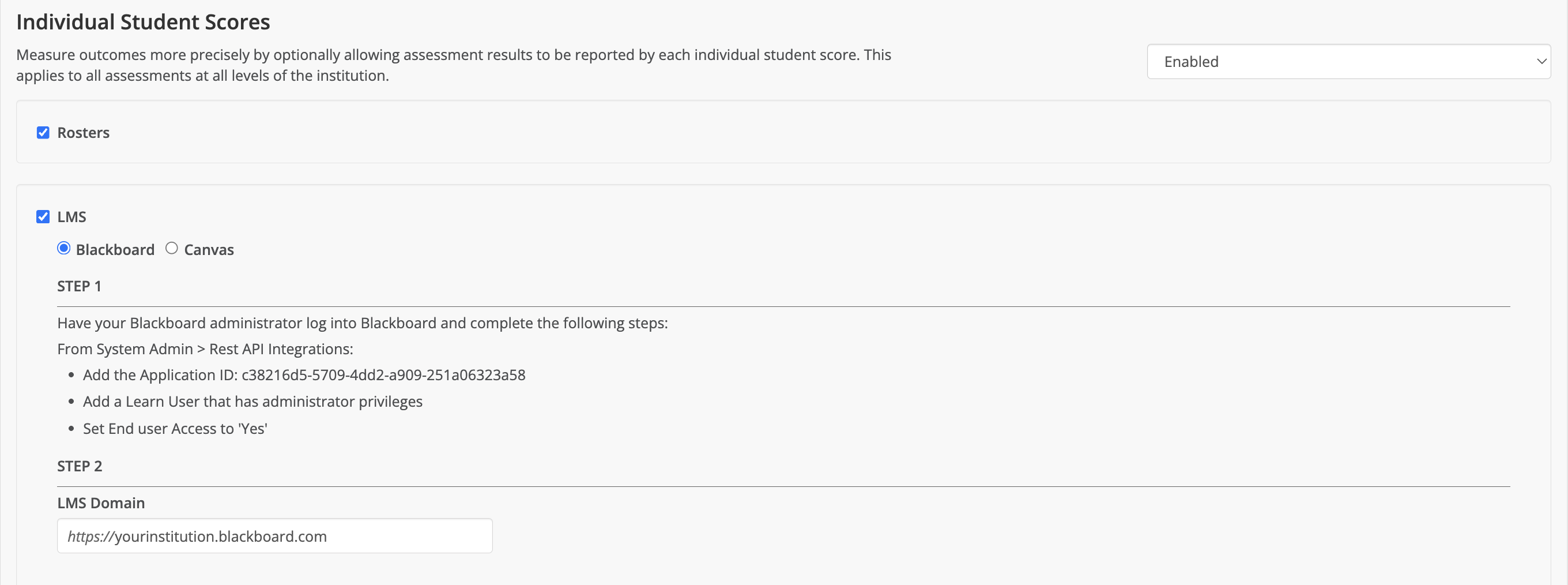
Using LMS Integrations
Once your LMS integrations are enabled you are ready to streamline the gathering of assessment results from your LMS. Use support articles to start using the LMS integration features.
Using Blackboard LMS for Outcomes Results